An investor agrees to a short introductory meeting. You have a product, some early evidence, and a folder full of planning documents. What you need now is a presentation that makes the business understandable. AI PPT Maker can help organize those materials into a draft without making slide design your first task.
For an early-stage founder, the challenge is often deciding what to leave out. You know the product’s history, every feature under consideration, and every conversation that shaped it. An investor hearing about the company for the first time needs a much shorter route through that information.
Start with the questions they need answered, then build the presentation around evidence you can explain.
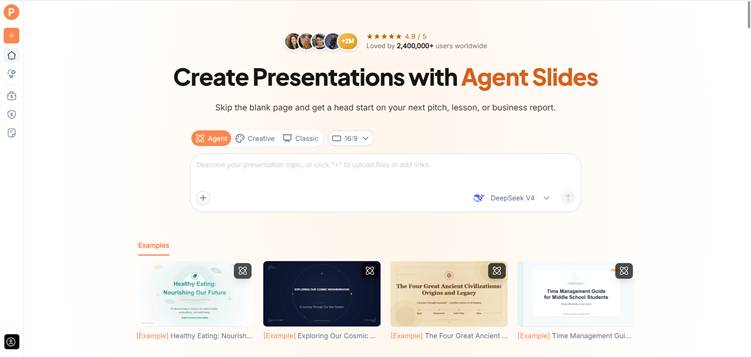
(Create presentations with AI PPT Maker)
Decide What the First Meeting Should Achieve
An introductory meeting does not need to cover every part of your business plan. Its immediate purpose may be to establish interest and earn a deeper conversation.
Write down the next step you want: another meeting, an introduction to a relevant partner, or permission to share further information.
That purpose helps you choose the right level of detail. A short opening conversation usually needs a clear account of the customer, the problem, your approach, and what you have learned so far.
Tell AI PPT Maker about the meeting’s purpose and the audience’s familiarity with your market. Do not assume a general investor will understand specialist terminology.
Write the Business in One Plain Sentence
Before generating slides, try explaining the company without mentioning your technology stack.
For example:
We help independent retailers identify products that frequently sell out, using information from their existing sales records.
That sentence identifies a customer, a problem, and an approach. It gives AI PPT Maker a more useful foundation than “Create an exciting pitch for our innovative platform.”
If you cannot explain the business simply yet, spend time on the explanation before choosing a visual style.
Separate What You Know from What You Expect
Early businesses work with a mixture of facts, estimates, and plans. Your deck needs to preserve those distinctions.
You may have completed customer interviews, run a small pilot, or recorded initial revenue. You may also have a forecast and a list of potential customers.
Do not combine these into one broad statement about traction.
Prepare source notes for AI PPT Maker that label the information clearly:
- Confirmed results and their dates.
- Observations from interviews or pilots.
- Estimates and the assumptions behind them.
- Work planned for the next stage.
A forecast should remain a forecast. Interest from a prospective customer should not become a signed agreement in the presentation.
Build the Argument Before the Visuals
AI PPT Maker accepts text and uploaded documents, including DOC, DOCX, and PDF files. You can begin with your business summary and verified notes.
A useful brief might read:
Create a presentation for a first investor conversation using these materials. Explain the customer problem, product approach, current evidence, business model, and next milestones. Keep forecasts separate from actual results. Do not invent market figures, partnerships, or customer quotations.
This sets boundaries around the draft. You still need to check every claim.
Give Each Slide a Question to Answer
Instead of beginning with familiar pitch-deck labels, think about the audience’s questions.
Who experiences the problem? How do they handle it today? Why would they choose your approach? What evidence supports your assumptions? What do you need to learn next?
AI PPT Maker can help organize those answers into a sequence. Review whether the resulting headings explain the business or merely name topics.
“Pilot users returned weekly” communicates a finding, provided it is accurate. “Traction” only introduces a category.
Use Agent to Sharpen the Explanation
Agent mode in AI PPT Maker supports follow-up conversation. That can be useful when the initial draft assumes too much background knowledge.
You might ask:
Explain the customer’s current workflow before introducing the product. Use the interview notes provided, and avoid adding unsupported claims about the market.
Another follow-up could ask for a shorter explanation of how the business earns revenue.
Keep these requests specific. “Make the pitch more convincing” gives less direction than identifying a question the draft has not answered.
Agent exports PPTX, allowing you to continue refining the deck in PowerPoint.
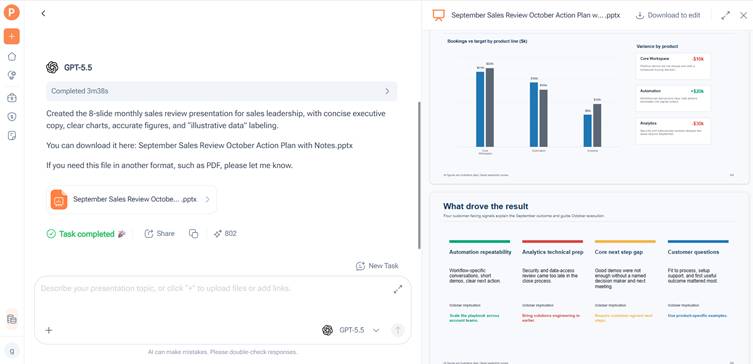
(AI PPT Maker Agent presentation preview)
Review the Outline for Gaps in the Business Story
All three modes in AI PPT Maker allow outline review before generating slides.
Read the outline as someone encountering the company for the first time. Check whether the product appears before the problem is understandable, or whether the business model depends on an assumption you have not explained.
Make room for unresolved questions. Showing what you intend to test next can help the audience understand the company’s stage.
The presentation should not sound more certain than the evidence allows.
Choose a Format You Can Keep Updating
A founder’s presentation changes as the business develops. New interviews, revised plans, and fresh results may alter the story.
Agent and Classic in AI PPT Maker support PPTX downloads, useful when you expect to edit individual elements in PowerPoint. Classic also provides options including PDF and Keynote.
Creative exports PNG images. Consider that format when visual pages suit your needs, while accounting for how often the content may change.
Choose a readable design. The audience needs to understand figures, assumptions, and milestones without struggling through small text.
Practise the Questions Between the Slides
Once the draft is ready, rehearse the explanation aloud. Notice where you need to add context and where you repeat information.
Ask a colleague to interrupt with basic questions. If a slide only makes sense after a lengthy explanation, it may need a clearer title or a simpler structure.
Other options include PPT Maker and NoteGPT’s AI Slide Generator. For this meeting, judge the AI PPT Maker draft by how accurately it explains your business.
Start with the Evidence You Already Have
AI PPT Maker can help turn business notes into a presentation that is easier to discuss and update. Begin with verified information, define the purpose of the meeting, and review the outline before generating slides. Try AI PPT Maker for your next investor introduction, then check the claims and practise answering questions. Keep PPT Maker in mind as another option as your presentation needs develop.